Composite Threat Reports: Triage Multiple IOCs Together
A phishing message or security alert rarely contains one indicator. Use a composite threat report to scope several IOCs without losing the evidence behind each result.
 IsMalicious Team
One alert often contains several pieces of infrastructure. A phishing message may include a sender address, a redirect URL, the final domain, a phone number, and a wallet. A malware alert can connect a file hash to a download host and a command-and-control IP. Checking each value in a separate tab answers individual questions, but it hides the shape of the event.
The composite threat report keeps those indicators together. It checks the set, calculates a combined assessment from the available results, and preserves a separate verdict and summary for every indicator.
STIX 2.1, the OASIS language for cyber threat and observable information, uses a graph-based model to express relationships across threat data. A composite report applies the same practical idea at investigation scale: related observables remain connected without losing their individual evidence.
Why Single-Indicator Triage Loses Context
Separate reports are necessary for depth. They are inefficient for scope.
When analysts work indicator by indicator, they must remember which values came from the same alert, copy results into notes, and reconcile conflicting verdicts themselves. That creates avoidable mistakes:
- a clean sender address distracts from a malicious redirect domain;
- the same IP is investigated twice because it appeared in two parts of the message;
- an unknown URL is treated as harmless even though its domain has strong malicious history;
- a high-confidence hash verdict is separated from the host that delivered the file;
- the final conclusion cannot be traced back to the original evidence set.
A composite view solves the coordination problem. It does not pretend that every indicator has the same meaning.
What the Combined Assessment Shows
The composite report presents two levels of information.
The first is a combined verdict and score for the set. It answers the triage question: does this group contain enough malicious evidence to deserve immediate attention? The score is based on indicators that returned usable assessments, so a missing result does not masquerade as a clean one.
The second is the evidence table. Every indicator keeps:
- its detected type;
- its own verdict;
- a short explanation when one is available;
- a direct link to the full report.
The report can use current or cached results, and it says which path produced the view. That distinction matters when an indicator changes quickly or when you need to reproduce a decision later.
Start from the Original Alert
The quickest route to a composite report is Smart Lookup. Paste the message, incident note, or alert text. Review the extracted indicators, remove anything irrelevant, then choose the option to check the complete set.
For a phishing report, keep values that represent distinct pivots:
- sender email address;
- visible domain;
- complete clicked URL;
- redirect destination;
- callback phone number;
- wallet requested for payment;
- attachment hash, when available.
Do not add every harmless word or internal hostname. The composite report is most useful when the set represents the event, not the entire contents of the message.
Read the Report in the Right Order
Use a consistent reading order to avoid anchoring on the first red badge:
- Check coverage. Count how many indicators returned a score and how many remain unknown or failed.
- Find the strongest malicious evidence. A known malware hash or confirmed phishing URL often carries more weight than a newly observed domain with little history.
- Look for agreement. Several independent malicious indicators strengthen the case. Repeated evidence from the same underlying source does not count as independent confirmation.
- Investigate contradictions. A clean domain beside a malicious URL may indicate a compromised legitimate site, an open redirect, or a stale observation.
- Open the decisive full reports. Inspect sources, timestamps, detections, infrastructure, and enrichment before blocking or escalating.
- Write the incident conclusion. Record which indicators drove the decision and which remained unresolved.
This order keeps the aggregate score in its proper role: a prioritisation aid, not an automatic containment command.
Before acting, use the Sources guide to distinguish independent confirmation from repeated upstream data.
Three Useful Composite Workflows
Phishing and smishing
Group the sender, domains, URLs, phone numbers, and payment wallet. The combined view quickly reveals whether the message contains one suspicious pivot or a coordinated set of malicious infrastructure.
Malware delivery
Group the attachment hash, download URL, host domain, and destination IP. This connects the payload verdict to its delivery path and helps the analyst decide which controls need an update.
Alert enrichment
Group the observables from one SIEM or EDR alert before creating a case. The result gives the investigator a scoped evidence set instead of a loose collection of screenshots. Preserve the lookup path in report history and prioritize confirmed work in Alerts and Action Center.
Know When to Move to Automation
Composite reports are designed for human-scale sets where the relationship between indicators matters. If your source produces hundreds of values, use the bulk lookup workflow or the lookup API. Those paths support the engineering work that large jobs require: normalisation, deduplication, chunking, caching, retries, and downstream routing.
For a message, alert, or incident note, keep the human in the loop. Open Smart Lookup, check the related indicators together, then move from the combined signal to the evidence that supports the decision.
FAQ
Frequently asked questions
What is a composite threat report?
A composite report checks several related indicators, presents a combined assessment for the set, and keeps an individual row for every IP, domain, URL, email, phone number, wallet, or hash. It is designed for scoping an incident before opening the decisive full reports.
Does the combined score replace the individual reports?
No. The combined assessment is a triage signal. Each row retains its own verdict and summary, with a link to the full report. Analysts should base containment decisions on the underlying evidence and context, not on the aggregate score alone.
When should I use the bulk API instead?
Use a composite report for a human investigation involving a small related set of indicators. Use the bulk API when a SIEM export, log query, or other machine-generated source produces a larger list that needs automated deduplication, retry handling, caching, and downstream processing.
Can one unknown indicator make the set look clean?
No. The combined assessment uses indicators that returned usable scores. Unknown or failed checks still need analyst review and should not be interpreted as clean results.
What should I do after a composite report?
Open the decisive full reports, inspect their sources and timestamps, record which indicators drove the conclusion, and move confirmed response work into monitoring, an alert, or a case.
Related articles
 Smart Lookup: Check Any Threat Indicator from One Search
Paste an IP, domain, URL, email, phone number, wallet, file hash, or a complete suspicious message. Smart Lookup routes each indicator to the right threat report.
 Threats Dashboard: Turn Current Intelligence into Priorities
Use the isMalicious Threats dashboard to move from a broad threat picture to the sectors, ransomware groups, malware, victims, and evidence that matter to your team.
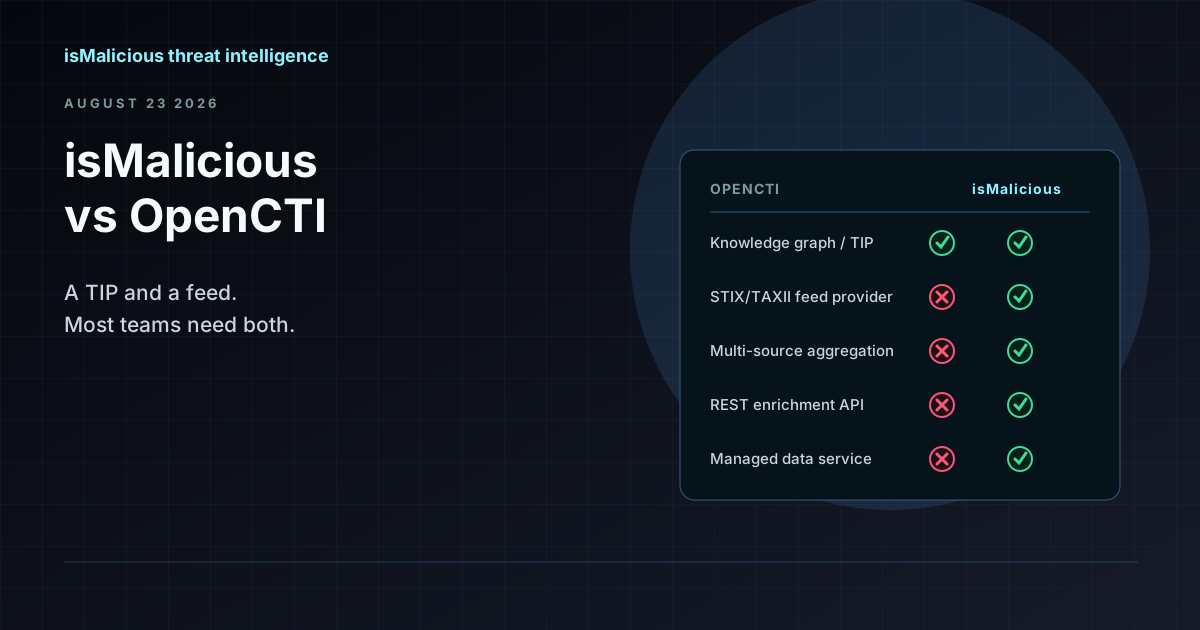 isMalicious vs OpenCTI: Why This Is the Wrong Comparison (and How They Work Together)
OpenCTI is a threat intelligence platform and knowledge graph. isMalicious is a data provider that feeds it. Teams searching for an OpenCTI alternative usually need a feed, not a replacement TIP.
Check any IP or domain
See what our indexed threat intelligence records say about it.
Try the IP / Domain Checker