Suspicious URL? Check Redirects Without Opening It
Inspect a suspicious link, find previously observed redirects and protect private tokens before deciding whether to run an isolated scan.
 IsMalicious Team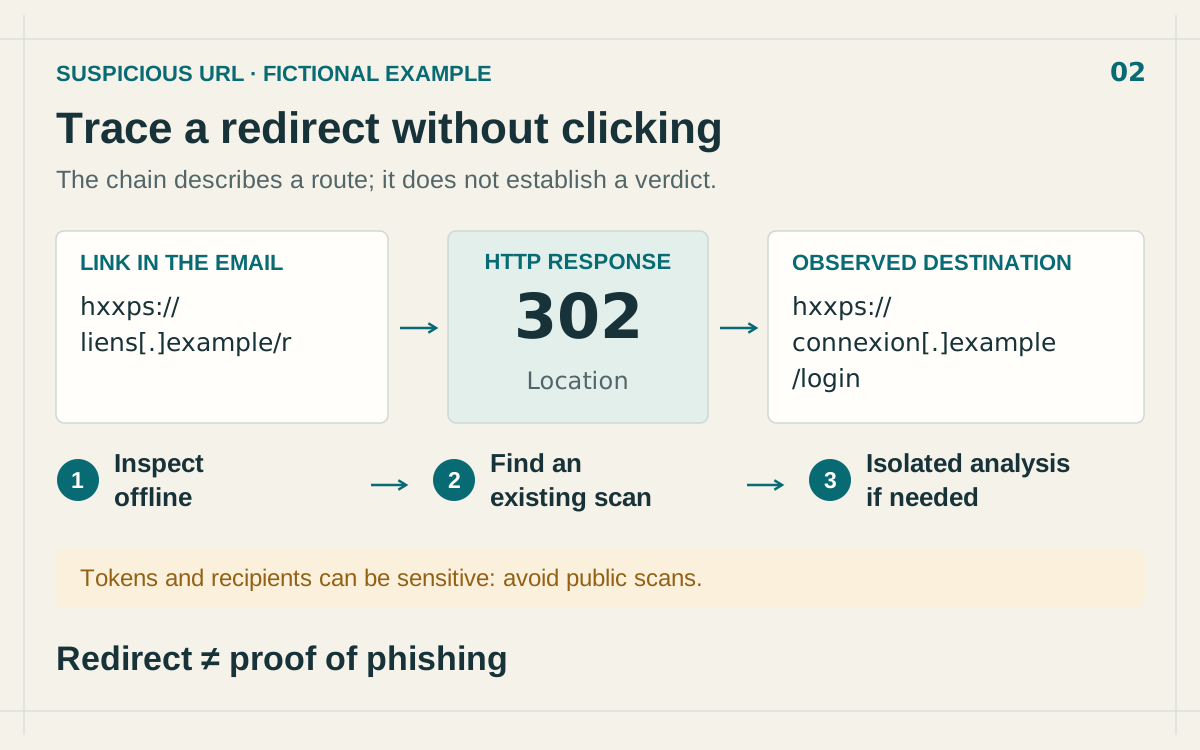
To examine a suspicious URL without visiting it, copy its target as text, identify sensitive data and look for existing observations. If those do not establish the redirects, use an isolated analysis environment. Reading a URL does not necessarily reveal the response its server will return.
That distinction matters when handling reported phishing. “Without opening it on my workstation” can still involve a remote scan that contacts the site. The contact happens from the analysis environment and needs to be an intentional decision.
Extract the target without loading a preview
Preserve the original message and its timestamp. Use your mail application's copy-link function or export the message according to your reporting procedure. A label such as “View invoice” can point somewhere entirely different from the address it suggests.
Paste the target into a local text editor that does not load previews. Avoid the browser address bar and chat applications that automatically expand links. On mobile, pressing and holding can trigger a preview, depending on the application. Use its reporting or export function if you cannot control that behaviour.
Keep the original in the restricted incident record. When sharing the indicator, use a defanged form such as hxxps://connexion[.]example/login. Defanging reduces accidental clicks; it does not encrypt or conceal information contained in the URL.
Inspect the full URL before reducing it to a domain
Separate the scheme, hostname, path and parameters. Look for fields containing another address without assuming that they describe the destination the server will actually serve.
This fictional example is deliberately defanged:
hxxps://liens[.]example/r?dest=https%3A%2F%2Fconnexion.example%2Flogin&recipient=[redacted]
The dest parameter contains an encoded address. Decoding it locally reveals a declared destination. It does not establish that the server will redirect there: the server can ignore the parameter, check a token or return something else. Preserve the original alongside the readable version, since repeated transformations can alter the meaning of a request.
A brand name in a path or parameter does not establish who controls the hostname. Compare the domain with one obtained independently, through a known application, an established bookmark or a verified contact. The suspicious message should not supply all the evidence of its own authenticity.
- Full URL: which path and parameters does the message want to open?
- Domain or hostname: which named destination is involved?
- Observed hosting IP: which infrastructure served that destination at the recorded time?
A domain-level classification does not necessarily describe every path. Likewise, a shared IP's reputation does not classify every website it hosts. Use a domain reputation check to add context while retaining the complete URL as investigation evidence.
Search for an existing observation
Before submitting a new scan, check whether the URL or its domain appears in existing results. urlscan search provides archived scans and supports date filters. urlscan search documentation.
Compare the scan's starting URL with the reported link. A result for the same domain but a different path may show a different page. Record the time, starting address, domain changes and observed destination. Review the stored details without following outbound links to the suspicious site.
Searching archives does not, by itself, trigger another visit to the target. It does send your search terms to the provider. Do not paste a confidential token merely to obtain an exact match. Start with a public domain or a path that does not disclose sensitive information.
Fictional scenario: an email link passes through a redirect before reaching a login page. Identify each step; a redirect alone does not establish phishing.
Check confidentiality before requesting a new scan
A URL can contain a recipient's email address, a document identifier, a password-reset link or a login token. Submitting it to a service transfers those values to that service. Depending on the link, visiting it can also consume a one-time capability or confirm an interaction.
On urlscan, public results are publicly visible; unlisted scans remain accessible to certain researchers and professional customers. private limits access to the account and people given the scan identifier. urlscan visibility levels.
Check the effective visibility and your organisation's handling rules before submission. For a usable secret, prefer an approved internal environment. Removing parameters protects some data but creates a different URL. The result then cannot validate the original link. Document that limitation instead of treating the modified scan as equivalent.
Also consider the destination's function. A link to a confidential document or an account action should not become a public test case merely because its appearance is suspicious. Preserve the evidence and route it to the people authorised to examine it.
Observe redirects in an isolated environment
When a fresh observation is necessary and authorised, use a dedicated environment without personal or work sessions and with controlled network access. Do not sign in or provide credentials to the page to push the investigation further.
An HTTP redirect can appear as a 302 response with a Location header. Navigation can also be triggered by HTML or JavaScript. Inspecting headers alone therefore does not cover every redirect mechanism. MDN redirect guide.
A link-expansion tool still makes a request. The absence of a browser window does not make the operation passive. Record each observed step, any errors and the point where analysis stops. Do not call a chain complete when the next stage requires an interaction the scan did not perform.
The configuration belongs in the evidence record. urlscan's API supports options including a user agent and scan country; preserve those settings when available. urlscan API options. The result describes an observation under those conditions, without guaranteeing what another device will receive.
Reach a verdict on the link actually observed
Your report should connect the original message and URL with the observed destinations, timestamps and evidence supporting the decision. Distinguish a confirmed malicious destination from an incomplete suspicious journey and a check that found no evidence.
If the expected content exists, access it through the official service opened independently of the message. To continue triage of a non-confidential link, use the IsMalicious URL scanner as a starting point and preserve the observations and their limits. Our guide to URLs and hidden threats covers the common signs of deception that complement this investigation procedure.
FAQ
Frequently asked questions
Can I find a redirect without opening the link?
You can read destinations embedded in parameters and consult existing scans. Without an existing observation, isolated network analysis may be needed to establish the destination actually served.
Does a shortened link always mean phishing?
No. A redirect hides a navigation step, but its existence does not establish abuse. Examine the destination, the request in the message and the available evidence.
Is an unlisted scan private?
Not on urlscan: unlisted scans remain available to certain researchers and professional customers. Check visibility before submitting a URL.
Why check both the full URL and its domain?
A specific path can serve a malicious page on a domain that also hosts legitimate content. Domain reputation alone does not describe the entire URL.
Related articles
 Parked Domains: Assess the Risk Before Blocking
Distinguish domain parking, expiration, and malicious behavior. Examine actual use and choose a restriction supported by the evidence.
 How to Analyze Suspicious Email Headers
Identify trusted servers, interpret Authentication-Results, and investigate a suspicious email without confusing authentication with safe content.
 Security LLM and Agent Workflows: When (and How) to Check Malicious Domains, IPs, and URLs Before Acting
AI assistants in SOAR, IDEs, and browser extensions can exfiltrate data or run malicious code if they fetch the wrong link. This guide gives guardrails: schema for tool calls, policy tiers, and where threat intelligence checks belong in the loop.
Check the suspicious URL
Review the URL's reputation and available domain context without opening the suspicious link in your browser.