IP Blacklisted? Check for a False Positive Before Blocking
Check DNSBL scope, shared IPs, stale evidence and lookup errors to find why an IP was blacklisted and choose a proportionate response.
 IsMalicious Team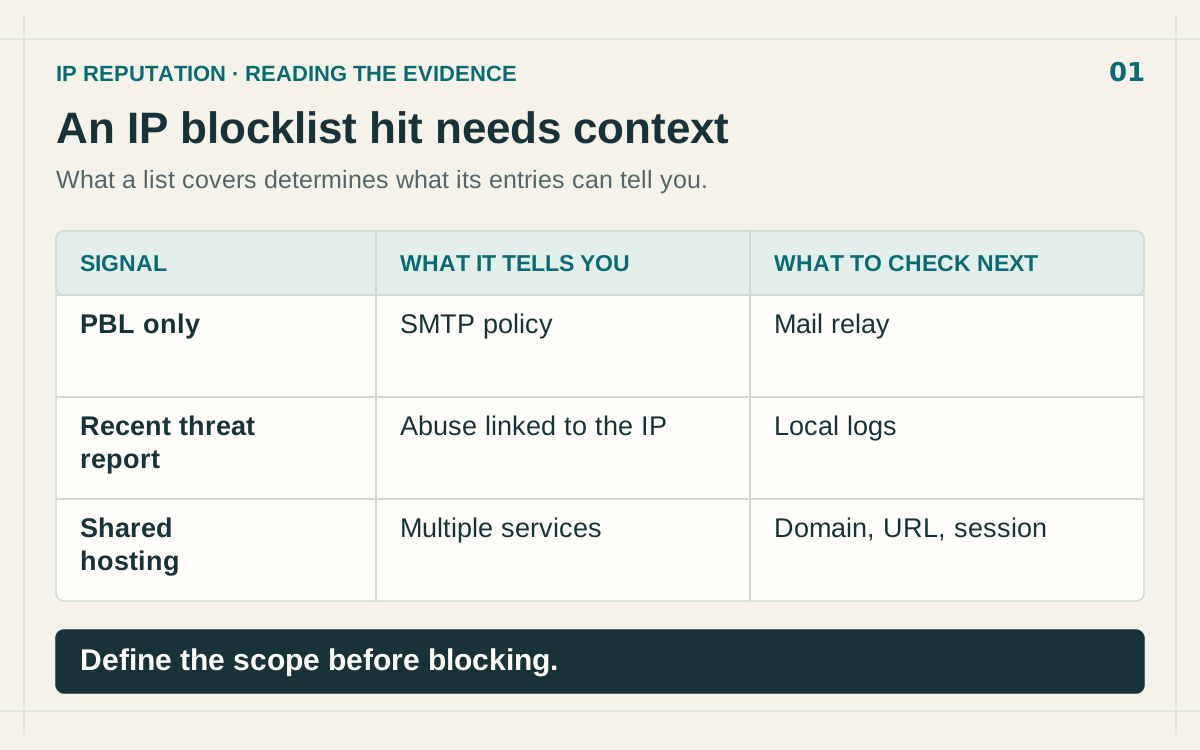
To investigate a blacklisted IP, identify the exact list and reason, compare its scope with the blocked traffic, then check the evidence against your own logs. A red reputation badge cannot, by itself, tell you whether to reject an HTTPS connection, an email message or an API request.
The investigation usually starts with a service failure: a customer cannot sign in, a partner gets denied, or outbound mail stops arriving. This guide works backwards from that failure to the decision that caused it. For an introduction to reputation signals, start with how to check whether an IP address is malicious.
Preserve the evidence behind the denial
Before editing a rule, capture the full error message and its corresponding event. A screenshot containing only a risk score does not explain why the request failed.
Record these details in the investigation ticket:
- The evaluated IP and its role: incoming client, your network exit, mail relay or remote hosting address.
- The affected service, protocol, event time and time zone.
- The rule that fired, the source name and the returned category.
- The lookup time and, where available, the time the abuse was last observed.
- The action actually taken: denial, quarantine, additional authentication or an alert without enforcement.
Check that the evaluated address belongs to the expected participant. Behind a proxy, a misplaced rule can evaluate the intermediary instead of the visitor. Trust forwarded client IP headers only when they come through your configured, trusted intermediaries. Otherwise, even a correct reputation result may apply to the wrong address.
Establish what the list actually measures
A reputation list answers a specific question. Read its listing reason before treating it as a general security verdict.
Spamhaus PBL identifies ranges that should not deliver mail directly to recipient mail servers. Spamhaus limits its intended use to SMTP and advises against using it to block web access. PBL membership therefore does not establish compromise. Spamhaus PBL documentation.
A command-and-control, phishing or intrusion signal calls for investigation of the activity it describes. Ask what was observed, which indicator it applies to and when it happened. A “proxy” category describes an intermediary; it does not, on its own, document an attack against your application.
Fictional scenario: an HTTPS request is denied solely because its IP appears in PBL. The matrix illustrates checks for different signal types; it contains no customer measurements.
In that scenario, the listing can be correct while the filtering decision is wrong. The fix belongs in the rule consuming the signal. Trying only to remove the badge leaves the cause of the next denial in place.
Rule out a DNSBL lookup error
An integration must distinguish “listed” from “lookup failed.” Spamhaus documents responses in 127.255.255.0/24 for query errors; these are not reputation verdicts. Spamhaus DNSBL return codes.
If many previously accepted IPs become suspicious at once, inspect the resolver, queried zone and response handling before declaring an abuse wave. Preserve the raw response and interpret it using the documentation for that particular list. A timeout should remain a lookup failure, without automatically becoming evidence that an address is malicious or safe.
This matters especially for older integrations and custom scripts that collapse every DNS response into a single boolean. Reproduce the error through the configured resolver and check the distinction between a valid listing result, an empty result and an operational failure.
Identify the service behind a shared address
IP sharing creates an attribution problem. RFC 6269 describes how SMTP blocking of a shared address can affect other subscribers using that address. RFC 6269, section 13.3.
For a web alert, recover the requested host, path, session and application. For outbound traffic, identify the endpoint or process that initiated the connection. A hosting IP's reputation cannot attribute the same behaviour to every domain served by that address.
Use the ASN and organisation to understand the network, then verify the service with evidence from your environment. A familiar provider name is neither an automatic exemption nor evidence against every customer. If historical reports conflict with a recent hosting change, ask the asset owner for any available assignment dates.
Keep the scope of attribution explicit. “This connection used an address associated with an abuse report” is a different finding from “this application performed the reported abuse.” Your ticket should show what connects those two statements, or what evidence is still missing.
Match the evidence period to the traffic period
“Looked up today” and “abuse observed today” are different facts. Store them separately. A result retrieved moments ago can describe an old event; a source without an observation date does not establish that its evidence is recent.
Next, ask a testable question: does your event match the reported behaviour? A scanning alert should lead to a search for attempts and targets in the available logs. A denied partner request should be compared with the expected session and service. Record uncertainty when the required telemetry is unavailable.
Counting providers does not replace that comparison. Several providers can repeat the same underlying report. Our guide to reputation scoring and false positives explains why duplicated evidence should not be treated as independent confirmation.
Choose an action with a defensible scope
- List used outside its intended scope: correct the rule and review the denials it caused.
- Query error interpreted as a listing: fix the integration and distinguish errors, absence and presence.
- Relevant evidence corroborated by local traffic: contain the affected traffic and investigate.
- Incomplete context with customer impact: request analyst review and define a narrow temporary measure.
An exception needs an affected service, an owner, a reason and a review date. Permanently allowing an entire range turns a temporary incident into a lasting blind spot. After the change, confirm both that the service works and that the expected controls remain effective.
If the source contains an error, prepare a correction request with the indicator, dated observations and supporting evidence. If genuine abuse has been remediated, document what was fixed. Those situations require different explanations, even when both end with a removal request.
Start by reviewing the IP's reputation in IsMalicious, then attach the available context to the denial ticket. The useful outcome is a decision another analyst can understand and revisit, with its supporting evidence preserved.
FAQ
Frequently asked questions
Does a blacklisted IP always mean malicious activity?
No. Identify the list, its reason, its intended scope and the observation time before classifying the associated traffic.
What does a Spamhaus PBL listing mean?
It describes a policy restricting direct email delivery from that IP range, rather than evidence of compromise.
How do you investigate a false positive on a shared IP?
Correlate the IP with the timestamp, requested domain or service, and session logs. Establish which traffic actually triggered the denial.
Should I request removal from a blacklist immediately?
First establish whether the listing is incorrect, its underlying cause has been fixed, or your rule is using the list outside its intended scope.
Related articles
 SOC Alert Fatigue: How Threat Intelligence Reduces False Positives Without Hiding Real Attacks
Alert fatigue is not a staffing problem alone. SOC teams need better evidence, source quality, confidence bands, and enrichment workflows that turn noisy alerts into defensible decisions.
 Proxy, VPN, Tor, and Datacenter IPs: A Decision Matrix for WAF, Fraud, and SIEM Rules (Without Breaking Real Users)
Not every "datacenter" IP is malicious, and not every Tor exit is a fraudster. This matrix-style guide helps you combine IP type signals with reputation and product context for safer, explainable security decisions.
 ASN Reputation for Threat Intelligence: How Autonomous System Intelligence Improves Prioritization and Hunt Programs
An IP address is a snapshot; an autonomous system (ASN) is a neighborhood. Learn how to use ASN context safely for triage, fraud, and security operations—without mistaking a giant cloud for a monolithic "bad host".
Check the IP behind the alert
Review the sources and dates of reported threats before deciding whether an IP should remain blocked.