Investigate an IOC Alert: Link IP, DNS and Process Logs
An IOC match is an investigation lead. Correlate DNS, network connections and process records to establish what happened on the endpoint.
 IsMalicious Team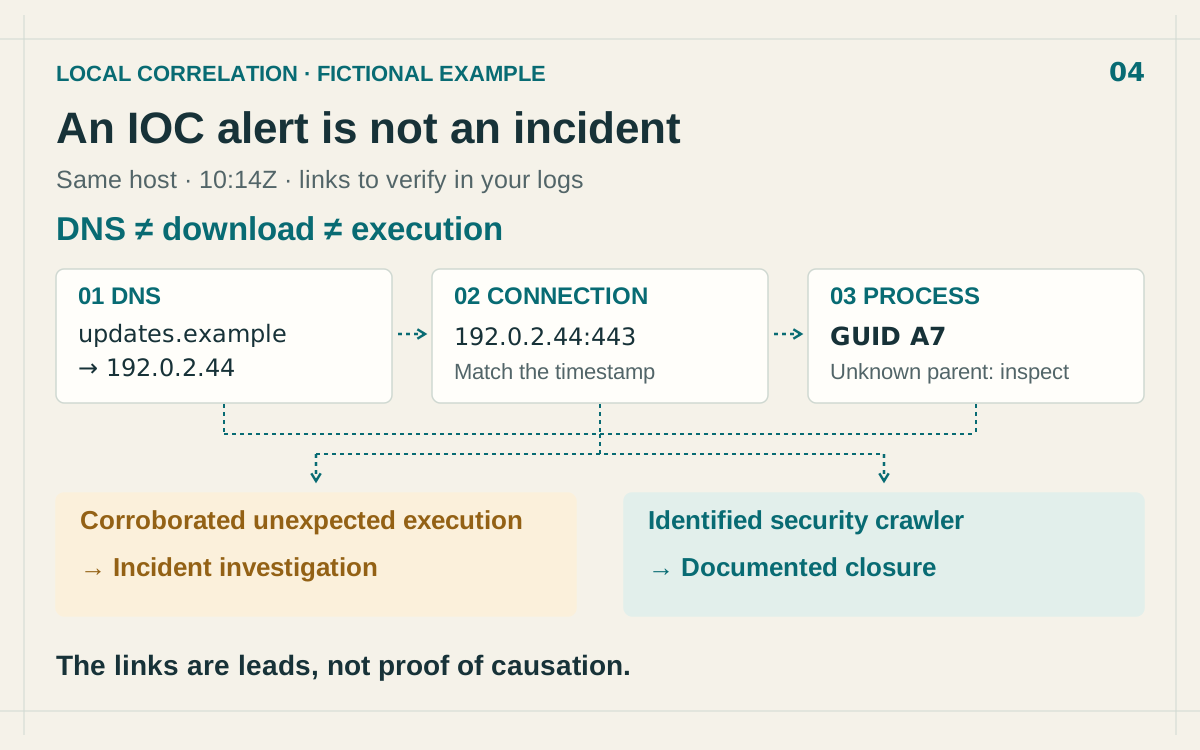
An IOC alert means that an event matched a known indicator of compromise: an IP address, domain, URL or file hash. That match alone does not establish that an endpoint is compromised. To determine what happened, connect the external intelligence to specific local activity.
The method below starts with a network alert and brings together three log families: DNS, connections and processes. The objective is a conclusion another analyst can verify, including both the available evidence and the steps that remain unknown.
Return to the event that triggered the alert
Open the raw record, rather than relying on the SIEM summary. Record the exact indicator, rule, intelligence source, event time and ingestion time. Check whether the rule ran against live activity or a retrospective search.
A domain reported today can occur in an old event. Conversely, a recent event can match a historical indicator whose relevance has changed. Compare intelligence and activity at their respective dates, without turning a present association into evidence that applies to every point in time.
Identify the actual asset next. A shared egress address can belong to a proxy, resolver or gateway. Until that role is established, the record does not necessarily identify a user’s endpoint. Check asset inventory and address assignments for the event time, rather than relying only on the current owner of an address.
Collect the three pieces of the correlation
- DNS: collect the client host, query name, answer, status and time. Which name was requested, and which answer returned?
- Network or proxy: capture the asset, destination, port, action, result and time. Was a connection attempted, blocked or established?
- Process: retain the asset, stable identifier, executable, parent, account and time. Which program initiated the activity?
On Windows, Sysmon provides event 22 for DNS queries, 3 for network connections and 1 for process creation. ProcessGuid supports correlation despite PID reuse. Event 3 is disabled by default, so check collection before interpreting a missing record. These properties are documented in Microsoft’s Sysmon reference.
The records do not have to come from one product, but their identities need to be understood. A connection observed by a proxy and a DNS request observed by a resolver cannot be joined simply because they occurred in the same minute. Preserve the source record identifiers so another analyst can verify the join.
Verify each link instead of assuming a chain
Fictional example. Arrows show relationships to verify during investigation, rather than automatic proof of a download or execution.
On an endpoint named HOST-17, the following normalized records appear. The domain and address are reserved for illustration; A7 abbreviates a fictional process identifier.
10:14:01Z  process  HOST-17  identifier=A7  parent=requires review
10:14:03Z  DNS      HOST-17  updates.example → 192.0.2.44
10:14:04Z  network  HOST-17  process=A7  destination=192.0.2.44:443
The process exists before the network observations. The analyst works backward from the alert to that process; the order of the investigation must not be confused with the order of events.
Start with the DNS answer observed at the time of the activity. Resolving the domain now can return another address. Compare endpoint identity, timestamp and destination address. If the DNS telemetry lacks a process identifier, mark that relationship as probable or unestablished, depending on the other evidence.
The next network record identifies a destination on port 443. The port number establishes neither the application protocol nor the exchanged content. Examine the connection result and available proxy or EDR details. A firewall “allow” decision is insufficient evidence of a completed download.
Find execution evidence that matches the hypothesis
A process creation record confirms that a process started. To assess whether that start is suspicious, examine its path, parent, command line, account and file origin where available. Compare those details against the expected behavior of the affected asset.
If the hypothesis is “this website delivered a program that then executed,” another link is needed. Correlate the created or downloaded file with the executed image, using its path and hash where collection permits. A browser appearing in the logs does not establish that chain by itself.
Conversely, an already installed program can make a connection without a preceding download. Adjust the hypothesis to the observed records. Automatically adding a download step would invent an event that the investigation has not established.
IOC enrichment for security operations supplies useful external context for these checks. Evidence of execution comes from telemetry on the affected system. Keep those roles distinct in the case record so a reputation verdict cannot accidentally stand in for a missing endpoint event.
Two possible outcomes from the same indicator
Corroborated unexpected execution. The process runs from an unusual location, its parent does not explain its launch and additional evidence establishes unauthorized activity. The IOC strengthens the investigation. The team follows its response process, preserves evidence and assesses affected scope before choosing appropriate containment measures.
An identified security scanner. The asset belongs to a link analysis service. The account, process and scheduled task match an authorized scan. The IOC match can be accurate while the hypothesis of a compromised employee endpoint is wrong. Closure documents that specific explanation, without declaring the domain safe or excluding the indicator everywhere.
These outcomes depend on the example’s evidence. The absence of another alert does not automatically create a third conclusion that nothing happened. If neither explanation is supported, preserve the open question and identify the next record or asset owner needed to resolve it.
Describe collection gaps before closing
Check clock synchronization, retention and active filters. Clock drift can reverse the apparent event order; a missing source can remove an entire step. The joint guidance on event logging and threat detection emphasizes a reliable, consistent time reference for connecting logs.
Retain a short conclusion with the affected asset, investigated period, demonstrated activity, unavailable observations and next decision. For example: “DNS query confirmed; connection cannot be verified because collection was inactive; endpoint owner contacted.” An incomplete finding remains useful when its limits are explicit.
Keep the evidence in your team’s incident record or investigation tool. Threat report history helps find previously checked indicators. To check the first indicator’s external context, open an IP or domain report, then record its dated result alongside the local events supporting your conclusion.
FAQ
Frequently asked questions
Does a malicious IP alert prove an endpoint is compromised?
No. Establish which asset contacted the address, when, through which process and with what result. The intelligence match is the starting point for that investigation.
Does a DNS query prove that a file executed?
No. DNS resolution, a connection, a download and execution are separate events. Each step requires supporting telemetry.
Which Sysmon events help correlate an IOC?
Events 1, 3 and 22 describe process creation, network connections and DNS queries respectively. Check collection settings, particularly for network connections, which are disabled by default.
Related articles
 NXDOMAIN: Diagnose a DNS Security Anomaly
Separate nonexistent names, negative caching, filtering and suspicious activity before treating NXDOMAIN errors as a security incident.
 Threat Report History: Recheck, Monitor, and Reuse Evidence
Use isMalicious report history to find earlier lookups, run fresh checks, add indicators to monitoring, create cases, and export a reusable lookup index.
 IOC Enrichment APIs: A Security Operations Guide to Faster Triage, Fewer False Positives, and Measurable ROI
An indicator without context is a ticket without an owner. Learn how IOC enrichment APIs work, which fields SOC teams need at each tier, and how to wire them into case management without building a data swamp.
Investigate an indicator from your alert
Check the IP or domain, then compare the report with the DNS and process evidence from your investigation.