School Network Security: Test Segmentation That Works
Plan school network segmentation around teaching needs, test permitted and blocked paths, protect administration, and manage changes without losing access.
 IsMalicious Team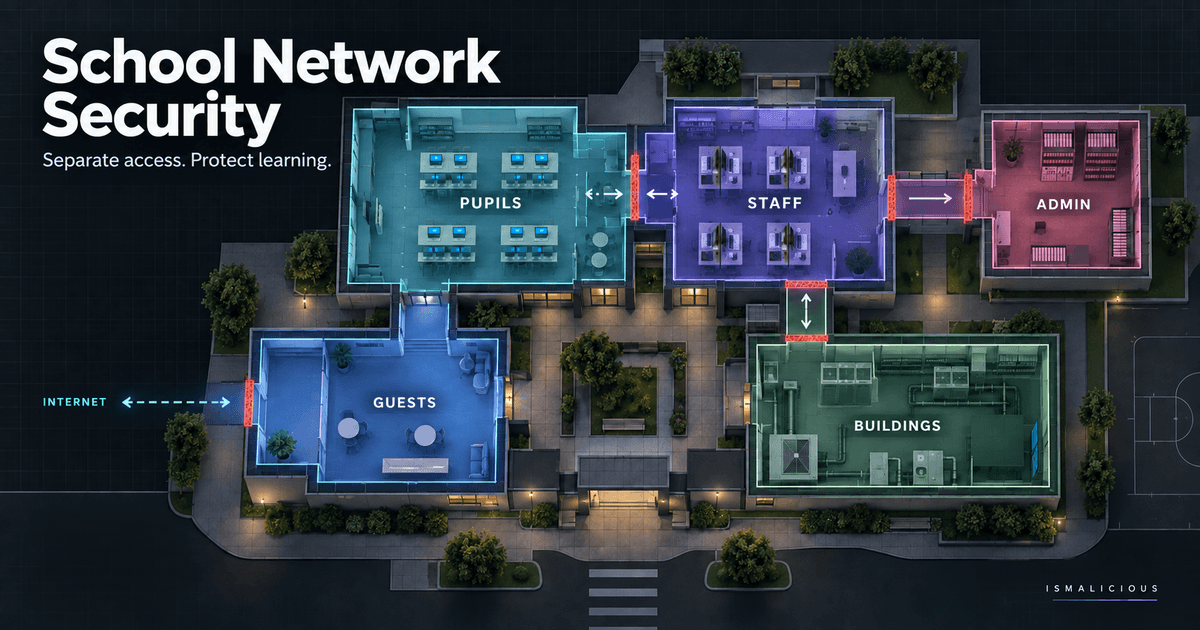
School network security depends on whether a device can reach the right services and is prevented from reaching the wrong ones. A pupil laptop should open its learning platform without gaining access to the finance application. A visiting presenter may need internet access without seeing classroom devices. A heating controller should not become a route into staff administration.
Network segmentation makes those boundaries explicit. Its value comes from enforced and tested access rules, not the number of VLANs, wireless names or firewall objects on a diagram. A school also needs to know whether a change will interrupt accessible learning software, registration, examinations or an essential building service.
This guide develops an original acceptance workflow for a fictional two-site school trust. The examples are synthetic. The Department for Education references concern England; NCSC programme references concern the UK. Schools elsewhere in Europe should apply the technical method alongside their own education authority's requirements. Completing these steps does not establish regulatory compliance.
Start with a teaching day, not a network diagram
The fictional North Mere Learning Trust wants to separate classroom devices from its administrative systems before the next term. Its initial inventory lists laptops, switches and servers. The missing information is what each service needs to do during an ordinary school day.
Ask a teacher to demonstrate registration, presenting a lesson, submitting work and printing. Ask the inclusion team to demonstrate the assistive tools pupils depend on. Ask office staff to show the administrative workflows that must remain available. Use demonstration accounts and documents, not live pupil records.
Record the service, user group, device type, destination, dependency and owner. A learning application may need an identity provider, a content service and a licence check. Permitting its main website alone may leave the actual lesson unusable.
The DfE cyber security core standard includes current network documentation and discussion of logging needs. The practical deliverable here is a local service record that lets teaching and IT staff agree what a successful change looks like.
Group access by purpose and consequence
North Mere's working design distinguishes managed teaching devices, staff administration, guests, infrastructure management and building equipment. These are planning categories, not a requirement to create exactly five networks. A small school and a large college may implement very different boundaries.
For each category, describe the damage that unrestricted access could cause and the connections it genuinely needs. Guest internet access does not justify access to internal management pages. A classroom printer may need a controlled printing service, but not permission to initiate arbitrary sessions towards office computers.
Shared services need deliberate treatment. DNS, time synchronisation, authentication and device management can support several groups. Document the specific paths rather than moving everything into a broad trusted segment because multiple departments use it.
The lateral movement guide explains why unnecessary reach matters after an initial compromise. In this school design, the immediate question is narrower: which connection could carry a problem from one educational or administrative service into another?
Specify the boundary where enforcement happens
Different Wi-Fi names can still lead to the same routed network. Separate VLANs can still communicate freely through a default rule. A device can also use a wired connection that bypasses the wireless policy the team just reviewed.
Record which component makes the access decision: a firewall, switch access rule, host firewall or application policy. Record who can change it and where its configuration is backed up. If the broadband supplier controls the boundary, obtain the relevant evidence from that supplier rather than assuming the school console represents the whole path.
The DfE network switching standard covers switching infrastructure and security features. Procurement capability and operational enforcement are different checks. A switch that supports access controls does not prove that the installed rules implement the school's intended boundary.
Give every material rule a purpose and owner. “Teaching devices to approved print service” is reviewable. “Temporary school access” is not sufficient once the person who added it has left or forgotten which lesson required it.
Keep identity controls alongside network controls
A segmented network cannot fix an administrative application that accepts a pupil account as an administrator. Conversely, an application login does not protect an exposed infrastructure management interface from every unwanted connection.
Check the role a test account actually receives. A supply teacher, permanent teacher and office administrator may use the same building while needing different rights. On shared devices, verify sign-out and profile handling rather than assuming the next user inherits a clean session.
The Zero Trust implementation guide provides background on explicit verification. For this project, retain a small access matrix linking the person or role, device condition and service. Avoid collecting more personal information than is necessary to establish that the policy works.
For managed cloud applications, the school may not control the provider's internal network. Test the identity and application permissions available to the institution. Do not mark that service as isolated merely because its traffic leaves through a school firewall.
Preserve accessibility and legitimate classroom services
Segmentation can expose dependencies that informal arrangements previously hid. Screen-sharing equipment may rely on local discovery. An assistive application may contact a separate licensing endpoint. A specialist classroom may use a device that cannot meet the same management requirements as a standard laptop.
Have the appropriate teaching or inclusion lead define an acceptance task. “The site opens” is weaker than “the learner can sign in, hear the content, save work and resume it on the approved device.” Use a demonstration workflow and record the relevant accessibility requirement without identifying an individual pupil.
If discovery across a boundary is required, evaluate a narrowly scoped service or controlled gateway. Broadly allowing all traffic between groups to restore a projector would defeat the purpose of the change. The exception should identify which devices and functions need the additional path.
For an unusual device, document the limitation and compensating arrangement. A blanket statement that every device must behave identically can exclude legitimate teaching needs without creating a workable security design.
Separate protective DNS from safeguarding decisions
Known-malicious-domain blocking, safeguarding content filtering and monitoring answer different questions. A malware-related destination can require a security investigation. A safeguarding concern needs the school's established safeguarding process and authorised staff. Neither should be inferred solely from the existence of a blocked DNS query.
The NCSC PDNS for Schools announcement explicitly says the service complements existing safeguarding filtering. Our public-sector protective DNS guide examines resolver coverage, roaming and exceptions. It does not turn a reputation result into a safeguarding assessment.
In England, the DfE filtering and monitoring standard assigns distinct responsibilities to leadership, safeguarding and IT. Establish those contacts before changing network paths so that a technical exception receives the appropriate review.
Do not bypass mandatory or policy-required filtering as a troubleshooting shortcut. Test an approved learning resource through the intended controls. If the resource fails, investigate the specific cause and use the school's documented exception procedure where one is applicable.
Create tests for permitted and prohibited paths
North Mere prepares a small acceptance set before changing the rules. Each test identifies a representative device group, a controlled destination, an expected result and the evidence needed. Tests are authorised and non-destructive; they do not require vulnerability scanning across a live school network.
A teaching device should complete the demonstration learning task. A guest device should reach the approved internet test resource but fail to reach a controlled administrative test endpoint. An authorised management device should access its designated console. A building-device test should preserve its required service while failing to reach the classroom test endpoint.
Record the outcome in a reusable form:
Test reference and approved change:
Source device group and connection type:
Controlled destination and intended operation:
Expected result: permitted / denied
Observed result and timestamp:
Enforcement evidence reference:
Teaching or service-owner acceptance:
Unexpected dependency and follow-up owner:
A timeout alone is ambiguous. The destination could be offline, DNS could fail, or a different control could block the request. Confirm that the controlled endpoint is available through its authorised path and inspect the intended enforcement point's evidence. Otherwise, a broken service may be mistaken for successful isolation.
Test the paths that are easy to overlook
Repeat relevant cases on wired and wireless access, at both sites, and through the approved backup internet connection. Check any supported IPv6 path as well as IPv4. A rule applied to one protocol or one site does not establish the same result elsewhere.
For managed devices used away from school, identify which policies follow the device and which depend on the campus network. Remote learning must not quietly become an untested exception. Record the supported location and device combinations rather than promising protection everywhere.
Test management reach separately from ordinary application use. An application can work correctly while its management interface remains unnecessarily exposed. Similarly, check whether an existing session survives a permission change when the expected outcome requires revocation.
Retain enough technical context to reproduce a result. The IP, DNS and process correlation guide helps explain why a single network record rarely establishes a user's action or the full sequence of events.
Phase changes around term, examinations and support capacity
Select a pilot group whose owner can verify the required workflows. Agree on a change window, an observation period and the conditions that would trigger rollback. Avoid moving every classroom immediately before examinations merely because the technical deployment is quick.
Check support availability at the affected sites. A successful evening test does not cover the next morning's simultaneous registrations, lessons and guest arrivals. The pilot should include a representative teaching period with a clear route for reporting failures.
Keep the previous configuration and the authority to restore it. A rollback plan should say which settings return, who approves the decision, and which acceptance tests run afterwards. Restoring connectivity without checking the boundary can leave a broad emergency rule in place.
The operational blocklist testing guide discusses controlled rollout and reversal for another class of security change. Here, the same discipline applies to network policy: define the evidence for continuing, pausing or reversing before the change begins.
Control supplier and building-system access
A heating or classroom-equipment supplier may need a maintenance connection. That does not justify permanent access to the entire school network. Record the named support relationship, destination, task, permitted period and person able to terminate access.
Building systems can have availability and safety constraints. Coordinate changes with the responsible facilities team and supplier, use an approved test method, and avoid disruptive experiments. An emergency override needs a documented purpose and review, rather than an open-ended bypass inherited from an old support call.
The public-sector supplier remote access guide provides a fuller access record. For the school project, confirm that the maintenance path does not cross into staff records, pupil devices or infrastructure administration without a separately authorised need.
After maintenance, test the expected closure. A ticket marked complete is not evidence that an account, remote session or firewall exception has stopped providing access.
Turn investigation findings into reviewed changes
When a security alert appears, retain the time, affected device group and relevant local evidence. Avoid interpreting an IP address as a named pupil or treating an automated background request as deliberate browsing. Keep safeguarding escalation and technical investigation within their authorised responsibilities.
For an approved public domain or IP address, an IsMalicious reputation report can add context to the technical case. Submit only the permitted indicator. Do not upload pupil records, browsing histories, signed access links or restricted attachments. A reputation result supports review; it does not authorise automatic school-wide blocking.
At the end of the pilot, deliver the current flow record, test results, exceptions, rollback evidence and unresolved issues to the service owners. Re-run the affected acceptance cases after a material change in devices, applications, suppliers or connectivity. The useful outcome is a boundary the school can explain, test and maintain while its teaching services continue to work.
FAQ
Frequently asked questions
What should school network segmentation separate?
Separate systems according to their purpose, sensitivity and required connections. Pupil devices, administrative applications, guests, infrastructure management and building equipment often need different access policies. The right design depends on actual services rather than a universal VLAN count.
Does creating different Wi-Fi names prove that networks are isolated?
No. Different wireless names or VLAN labels do not prove that routing and access controls prevent unwanted connections. Test authorised and prohibited paths from representative devices and retain the results.
Does protective DNS replace school safeguarding filtering?
No. Blocking known malicious domains serves a different purpose from safeguarding filtering and monitoring. NCSC PDNS for Schools explicitly complements existing safeguarding measures rather than replacing them.
Do the DfE standards apply throughout Europe?
The Department for Education guidance discussed here concerns England. Other UK education systems and European jurisdictions have their own requirements and responsible authorities. Adapt the technical method to those requirements.
Can a school send pupil browsing data to a reputation service?
This workflow does not require that. Investigate locally first and use only an approved public indicator for any external reputation lookup. Keep pupil identifiers, signed links, restricted files and detailed browsing histories inside the authorised investigation environment.
Related articles
 Local Government Network Security: A 90-Day Council Plan
Build a council network security plan around public services, clear ownership, tested segmentation and useful logs, with practical actions across 90 days.
 Public Sector Supplier Remote Access: Control Every Session
Control supplier remote access with named identities, agreed work windows, bounded paths and verified revocation, using a practical public sector example.
 Blocklists for Operational Threat Prevention: Test and Roll Back
Use /app/blocklists to select, test, deploy, measure, and safely reverse IP or domain prevention controls.
Check any IP or domain
See what our indexed threat intelligence records say about it.
Try the IP / Domain Checker