DevSecOps: Integrating Security into the CI/CD Pipeline
Security should not be an afterthought. Learn how to implement DevSecOps to automate security testing and vulnerability scanning within your development workflow.

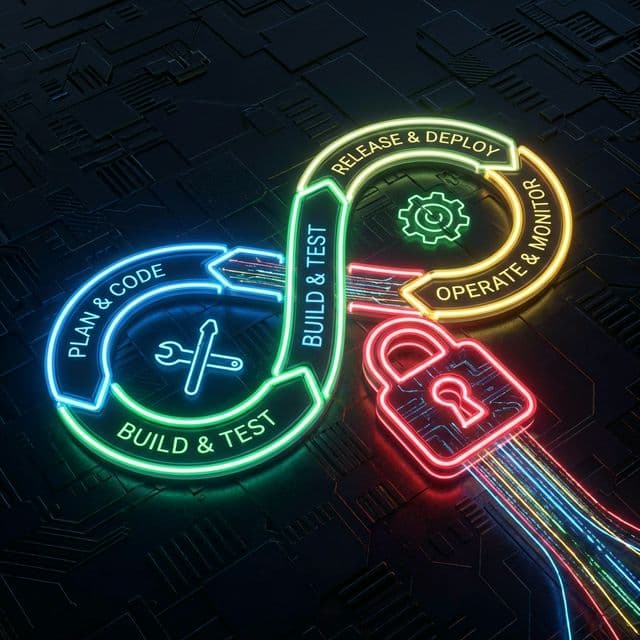
In the traditional waterfall model, security was a "gate" at the end of the development cycle. Security teams would scan the code days before release, find hundreds of vulnerabilities, and block the deployment. Developers would be frustrated, deadlines would be missed, and the "us vs. them" culture would deepen.
With the shift to DevOps and Agile, engaging in monthly releases became daily or hourly deployments. The old security model broke. You cannot have a manual 3-day security review for code that needs to ship in 1 hour.
This necessitated DevSecOps: Shifting security left.
What is DevSecOps?
DevSecOps is the philosophy of integrating security practices within the DevOps process. It means thinking about application security from the start, not just at the end. It involves automation, culture, and platform design.
The goal is to make "doing the secure thing" the easy path for developers.
Key Components of a DevSecOps Pipeline
To integrate security into your CI/CD pipeline, you need specific automated checks at each stage.
1. SCA (Software Composition Analysis)
Where: Commit / Build Stage
Modern applications are 80-90% open-source code. SCA tools (like Snyk, Dependabot) scan your package.json or pom.xml to identify known vulnerabilities in your dependencies (e.g., Log4j).
2. SAST (Static Application Security Testing)
Where: Commit / Build Stage SAST tools analyze your source code for insecure coding patterns without running the application. They can find SQL injection flaws, hardcoded credentials, and buffer overflows. By running this on every pull request, developers get immediate feedback while the context is fresh.
3. Secret Scanning
Where: Pre-commit / Commit Stage
Developers accidentally committing API keys or AWS secrets to Git is a massive risk. Tools like git-secrets or truffleHog scan changes for high-entropy strings or known key formats and block the commit or alert the team.
4. DAST (Dynamic Application Security Testing)
Where: Test / Staging Environment DAST tools attack the running application from the outside, just like a hacker would. They test for runtime vulnerabilities like Cross-Site Scripting (XSS) or broken authentication. This usually happens in a staging environment before production.
5. IaC Scanning (Infrastructure as Code)
Where: Build Stage If you use Terraform or Kubernetes, IaC scanning ensures your infrastructure is secure before it is provisioned. It checks for misconfigurations like open S3 buckets or root access enabled in containers.
The Culture Shift
Tools are the easy part. The hard part of DevSecOps is culture.
- Shared Responsibility: Security is everyone's job, not just the security team's. Developers need to be able to fix security bugs just like they fix functional bugs.
- Security Champions: Embed security-conscious developers within product teams to act as advocates and bridges to the central security team.
- Blameless Post-Mortems: When a vulnerability slips through, focus on fixing the process, not blaming the person.
Using Threat Intelligence in DevSecOps
DevSecOps isn't just about code scanning; it's about supply chain security.
When your build pipeline pulls a Docker image or an npm package, check its reputation. Is it a typo-squatted package? Is the download source legitimate?
isMalicious can be integrated into your pipeline to validate the domains and IPs your application interacts with during DAST testing. If your staging app is observed calling out to a known malicious IP (perhaps due to a compromised dependency), automated tests should fail immediately.
Conclusion
DevSecOps enables organizations to release software faster and safer. By automating security checks and integrating them into the developer's daily workflow, you reduce the cost of fixing vulnerabilities and eliminate the "deployment blocked by security" bottleneck.
Start small: add dependency scanning to your pipeline today, then iterate.
Related articles
 Local Government Network Security: A 90-Day Council Plan
Build a council network security plan around public services, clear ownership, tested segmentation and useful logs, with practical actions across 90 days.
 School Network Security: Test Segmentation That Works
Plan school network segmentation around teaching needs, test permitted and blocked paths, protect administration, and manage changes without losing access.
- Healthcare IoT Security: The Critical Risk to Patient Safety
Connected medical devices (IoMT) introduce life-critical vulnerabilities into hospital networks. From MRI machines to insulin pumps, this guide analyzes the unique challenges of securing legacy firmware and unpatched operating systems.
Protect Your Infrastructure
Check any IP or domain against our threat intelligence database with indexed records.
Try the IP / Domain Checker